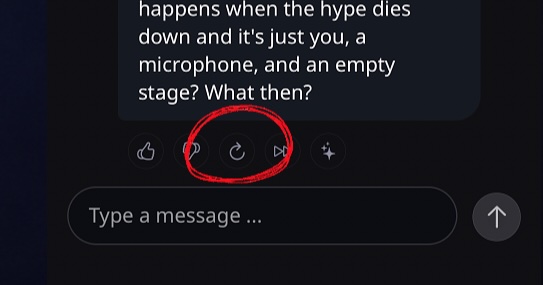
Tigbit now lets you reroll bot responses for a fresh take. Follow this simple tutorial to learn how to generate a new AI response and customize the length to match your preference.
Sometimes, a bot response isn’t quite what you wanted. Maybe you’d prefer a different direction, different wording, or simply a longer or shorter answer. With the new reroll feature in Tigbit, you can instantly generate a new response from your favorite AI character.
How to Reroll a Bot Response
- Open a chat with any AI character
- Type and send your message.
- The character will respond. If you’d like to see a different answer, simply tap the looping arrow button located below the message.
- A new response will be generated right away.
That’s all there is to it! You can reroll as many times as you like until you get the response that fits best. You can even change the model and do a reroll.
Adjusting Response Length with Rerolls
Rerolls aren’t just about getting a different answer—you can also control how long or short the response should be.
- Open the settings menu in the upper-right corner of the chat screen.
- Find the "Response Length" option.
- Choose your preferred length (e.g., Short, Medium, or Long).
- Reroll the message again by tapping the looping arrow.
- The AI will now generate a response that matches your chosen length.
For example, if you select "Long", you’ll get a much more detailed and extended reply after rerolling.
Tips for Getting the Response You Want
- Rerolling is perfect when you want a different tone, phrasing, or more depth.
- Combine rerolls with response length settings to fine-tune your chats.
- Experiment with different lengths to see how your AI character adapts.
Ready to try it out? Open Tigbit, start a chat, and give reroll a spin!